In this Quick and dirty post, let’s see a simple fix for one of the annoying error messages you’ll see in SQL Server 2005. Basically, You’ll see below mentioned error in few cases when you try to change the sa password using SSMS.
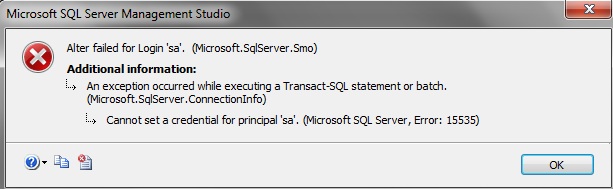
The Simple trick is to check the box “Map to credential” as shown below after providing a new password and click Okay.
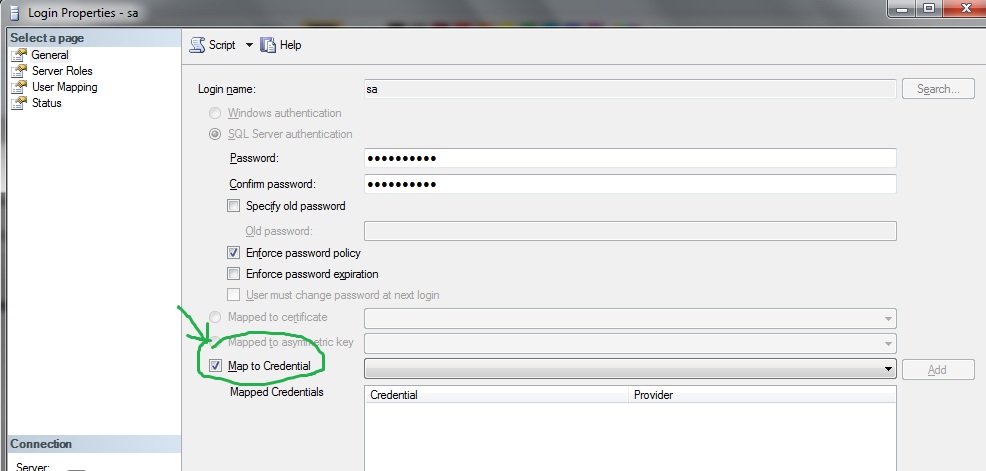
This should work…Hope this helps!


12 responses to “Cannot set a credential for principal ‘sa’. (Microsoft SQL Server, Error:15535)”

  1. spiller Avatar
    spiller

    It works! thanks

  2. Ahmed Avatar
    Ahmed

    thanks..it works successfully
    but why it return to unchecked after we press ok??

  3. Gabi Avatar
    Gabi

    Great solution! Thanks!

  4. mano Avatar
    mano

    Tnx its working

  5. naveen Avatar
    naveen

    it’s working

  6. Jim Avatar
    Jim

    its working… what was the problem and why does that fix it?

    1. sreekanth bandarla Avatar
      sreekanth bandarla

      I’ve encountered this only once, I think it could be small bug(within SSMS). Here’s the Microsoft KB article for this issue…Am not truly satisfied with the explanation provided by MSFT as well. But hey….that fixes our annoying little issue!
      https://support.microsoft.com/en-us/kb/956177

      One more reason to prefer T-SQL over SSMS for making small changes 🙂

  7. Ratnesh Sharma Avatar

    no its working i am trying to it if u have any other solution so please revert to me

  8. Ranjith Brarath Ravi Avatar
    Ranjith Brarath Ravi

    thanks its working

  9. eperez Avatar
    eperez

    Excelente, funcionó
    Gracias

  10. Claus Avatar
    Claus

    Gracias!!! perfecto

Leave a comment

I’m Sreekanth

Welcome to MSSQLTREK, my little corner of the internet where I geek out about SQL Server, databases, and all things cloud. This blog is my space to share lessons learned, cool tips, real-world troubleshooting stories, and the occasional deep dive into data and performance. Whether you’re a fellow Cloud Architect, DBA, Developer, or just cloud-curious, come along for the ride — let’s explore, optimize, and build awesome data solutions together!

Let’s connect