It’s friday and it’s dark and drizzling outside which usually makes me lazy..,:) But I got this one ticket from one of our customers requesting to create a Login which made me active :D. Well, thought creating a login is just a basic routine security request, Went ahead and tried creating the login from SSMS. It failed…saying “The server principal already exists”
Well, I thought the login already exists and verified from SSMS( I didn’t found one…Hmmm Interesting). Assuming might be a bug in SSMS, i tired using T-SQL, same message again…as you can see below.

Basically, I am not seeing the login(Server Principal) but SQL Server says it already has one!!!…To double check I queried sys.server_principals and also used sp_helprevlogin to see if it can show something useful to me. But I had no luck again as you can see below…they are not giving me any useful results when I am querying using Login Name.
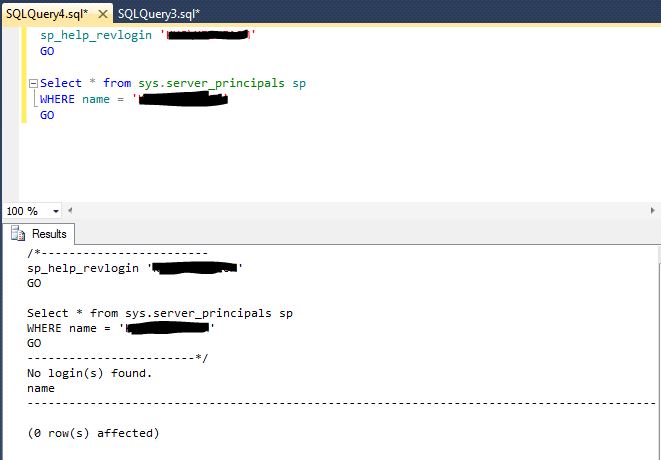
Now..It’s time to play with SIDs(SUSER_SID is super useful in this scenario). I queried SUSER_SID passing the login name which I am trying to create, Interestingly it returned a row as you can see below…

Right away I queried sys.server_principals again, but with SID(Use the SID which came from the above query) this time as opposed to Login Name. Results are shown below

Tadaaaaa…..There you go! It returned a different login name which already exsits on the SQL Server with the same SID of the new login which I’m trying to create.
So, I contacted customer saying ‘ Hey, Login A is conflicting with your login, do you happen to know what Login A is?’ I got a response, that was her Old Windows user account(her Lastname got changed recently)
Now all I’ve to do is drop her old login(Remove DB mapping as needed) and create new login, fix DB mapping and permissions. Hope this helps…Happy Friday folks 🙂


Leave a reply to Julie Hargraves Cancel reply