were you ever curious to know on which domain you are logged into currently and what is your user SID and what are all the groups you belong to and what are all the permissions you’ve etc?? Wouldn’t it be nice if we get all this info at a single place, with a single command? “WHOAMI” is the guy which can do it for you. Before moving on to WHOAMI please see below screenshot for legacy “ECHO” command. Basically I’m showing you how can we pull username and/or domain name.

WHOAMI:
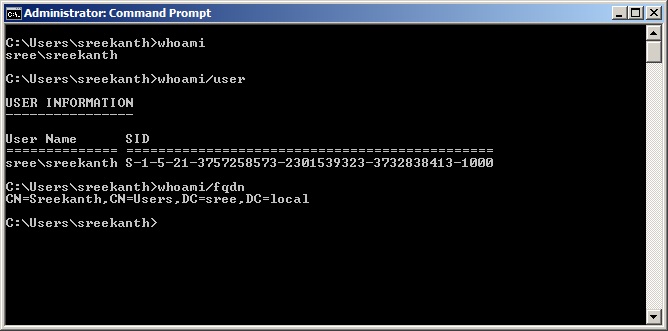
Basic “whoami” will give you the same info..you can see below.

Let’s get little fancy now…by appending “/USER” switch.

in the above screenshot you can see SID as well…Okay, let’s see by appending “/FQDN” switch now.
well, how about appending “/ALL” Switch?
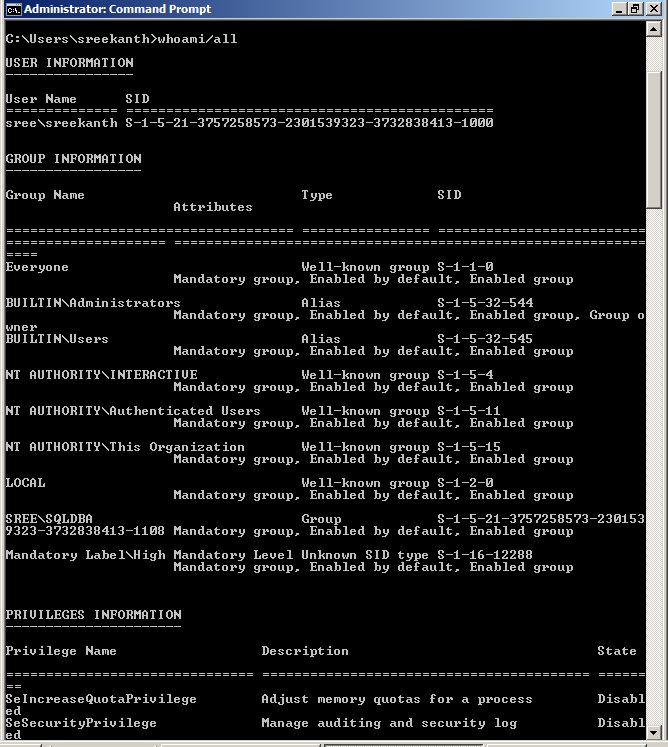
As you can see I’ve got very detailed information using “ALL”! Instead, I can buffer this to some text file using ‘>whoami.txt’ and open it later anytime using Notepad…


Leave a comment